

Using your Sky remote.
Enjoying Sky TV during your stay is easy. We’ve put together a simple guide to help you understand the Sky remote and make the most of the channels available in your room. Just follow the steps below to get started.
Your guide to easy viewing.
Get to know your remote
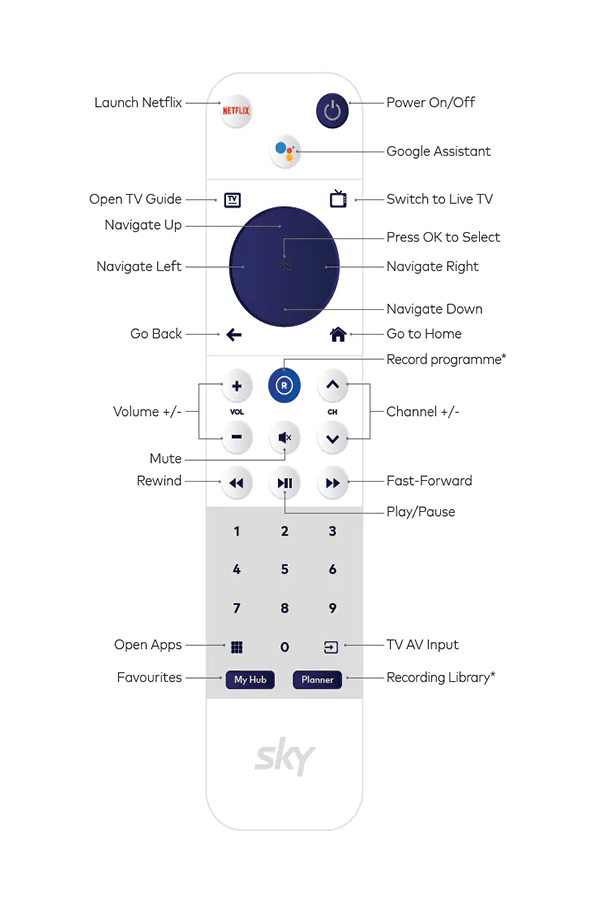
Google Assistant
Do more on your TV using your voice. Talk to Google to easily search for movies and shows across live TV, on-demand, and streaming apps. Change the channel, pause, or go back. Even control smart devices, manage tasks, and much more -all on your TV with your voice.
Press the Google Assistant button on your remote to get started. Try saying:
"Find action movies"
"Turn down the volume"
"Find yoga videos on You Tube"
"Go to home screen"
"Play Game of Thrones"
Find our easy-to-follow help videos and FAQs here : www.sky.eo.nz/skyboxhelp